In a Nutshell
A booking widget is a snippet of code, usually three to ten lines. You copy it out of your property management software, paste it into a page on the website you already have, and save. You do not need a developer, you do not need to rebuild the site, and you do not need to understand the code. The whole job is an afternoon, and most of that afternoon is loading your rates.
This one is for you if
- You already have a website for your place, on Wix, Squarespace, WordPress, Webflow or anything else.
- The booking page currently says "email me your dates and I'll check availability."
- Or there is a button on it that sends your visitor to Airbnb, Vrbo or Booking.com.
- You looked into adding real booking once, decided it was a project, and moved on to something else.
You did the hard part already. You bought the domain, wrote the copy, chose the photos and got a real site up. The booking step is the smallest piece left and creates the biggest wins for you.
What the widget actually does
The snippet puts a live calendar and a book now button on your own page, under your own domain. A traveller picks dates, sees the real price with fees and taxes calculated, pays by card, and gets a confirmation or will wait for you to accept the booking. You get an email and the booking lands on your calendar as soon as you accept it, already blocked on every channel you list on. Nobody is checking availability by hand at 11pm, and nobody is waiting until tomorrow for an answer.
That last part is the whole game. A traveller browsing at 10pm will not wait for an email back to learn if your place is even available. They will book the place that lets them book.
Where the snippet comes from
You cannot buy a booking widget on its own, and that turns out to be the good news. The widget comes bundled with property management software, and it is the part of that software hosts notice least. For roughly $40 a month on a single property you are not buying a book now button. You are buying a system that saves you hours every week and makes taking a direct booking safe. Here's the list of added features:
- The booking engine and widget. Live availability, real rates and secure card payment on your own site.
- Channel management. Your Airbnb, Vrbo and Booking.com calendars stay in step with your direct calendar, so one booking anywhere blocks the dates everywhere. This is the piece that makes the double-booking fear go away.
- Rates and rules. Seasonal pricing, weekend rates, minimum stays, gap rules, cleaning and pet fees, taxes calculated at checkout.
- Payments. Connects to Stripe or similar. Deposits, balance due dates and split payments are usually built in.
- Automated guest messaging. Confirmation, pre-arrival note, door code and check-in instructions, checkout reminder, review request. Written once, sent on schedule, forever.
- Rental agreement and e-signature. The guest signs your terms before they get the door code, which is something a platform booking never gave you.
- Damage deposit or damage protection. Hold a deposit or add a protection fee, then release or claim it.
- One inbox for platform messages and direct guest email instead of four apps.
- Cleaner and turnover scheduling, so your cleaner sees the calendar without you forwarding anything.
- Reporting by month, by channel and by property. Useful in February at tax time, and useful when you are setting next year's rates.
- An iCal or API calendar feed, which is what lets your StayCanadian listing show travellers accurate dates.
- A website builder you can safely ignore, because you already have a site you like.
Some of these sit on higher tiers depending on the provider, and a few charge a small percentage on direct bookings, so read that line before you sign up. Free trials are normal and two weeks is usually enough to know. We have a separate guide on picking one and getting your calendars talking to each other.
Read next: Choosing a PMS and setting up calendar sync
Pasting your booking widget into the site you already have
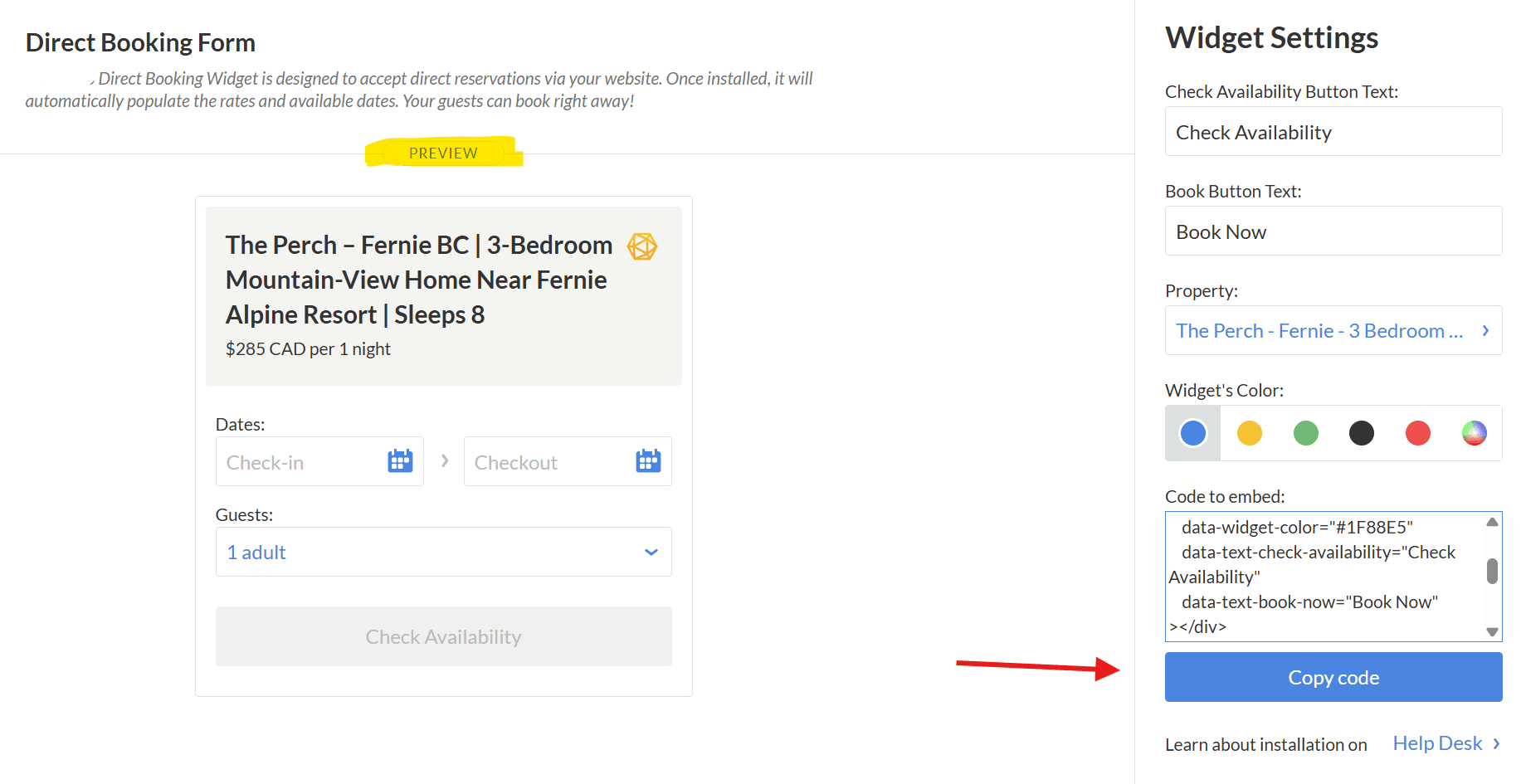
Every major site builder has a block for this. It is usually called an embed, a custom code block, or custom HTML. You add that block to your booking page, then copy and paste the widget code your PMS gives you, and publish. If you paid someone to build the site, forward them the snippet and tell them which page it goes on. It is a five minute job for them, and you should not be quoted for a redesign to do it.
- Remove the "Book on Airbnb" button once the widget is live. Leaving both up sends your own visitor to pay a commission you were trying to avoid.
Related: Insurance and damage deposits for direct bookings
The math on one booking
A $2,000 booking through a platform costs you roughly 18 percent once the host fee and the guest-side markup are counted. That is about $360 gone from a single stay. The same booking taken on your own site costs you about $58 in card processing. Software at $40 a month is $480 a year, so two direct bookings cover it and leave you ahead.
The commission you stop paying is not really a saving to pocket, though. It is room to price with. Hand most of it back to the traveller and your direct rate lands visibly below your Airbnb rate, you net about the same, and the guest has a reason to book with you instead of through the OTA. Cheaper nights are also how a three-night stay becomes four.
Related: Pricing and revenue for your vacation rental
Do this in an evening
- Start a free trial with a PMS.
- Connect your Airbnb and Vrbo calendars first, both directions, so everything is in sync before you take a single direct booking.
- Load your rates, fees, taxes, minimum stays, damage deposit and cancellation policy.
- Setup the Stripe account to enable the secure third party credit card processing. It'll take ten minutes.
- Copy the widget code and paste it into your booking page.
- Take the platform button off your site.
- Put your website address in your social media bios where possible, your email signature, and in the guest book or on a card in the unit.
The wall most hosts are looking at is mostly the idea of the wall. Once the widget is live, list the property on StayCanadian and we will send Canadian travellers straight to that booking page. No commission, no guest fee, and we never touch the reservation.